I’ve been back at work on the ‘untitled’ shmup1.
Last time we saw it, I had basic player movement including a double-tap barrel-roll strafe, the ability to shoot blaster bolts, a parallaxed starfield and a nebular background. All these components were extensions to the primary StaticRectangle engine, mostly via the Script system. The nebular is a render pass hook, something other games can use too.
The next thing I wanted to look at was some kind of HUD (heads-up display).
For StaticRectangle I have two choices:
Use the DOM (document object model)
Because SR is a web-based engine running in the browser, I could just use the browser for the HUD. I’m already doing this with the stats overlay and the lil-gui powered scene controls.
A big pro for this is the huge amount of out of the box components and easy way to style them (css). I’d just have to wire it up (of course it’s that easy).
Use the Renderer
The other option is to render the HUD. Because it is passive (you don’t interact with it), it should be easy enough to throw some geometry into the scene and render it.
The big pro for this is that it can integrate better into the games aethetics and I have full control over it.
For this project, the renderer makes the most sense.
The HUD
The HUD for this game is going to be pretty simple. Power, shield and ammunition bars and a score. As with most things, there are many ways you could approach this.
A common approach, especially for text, is a texture atlas.
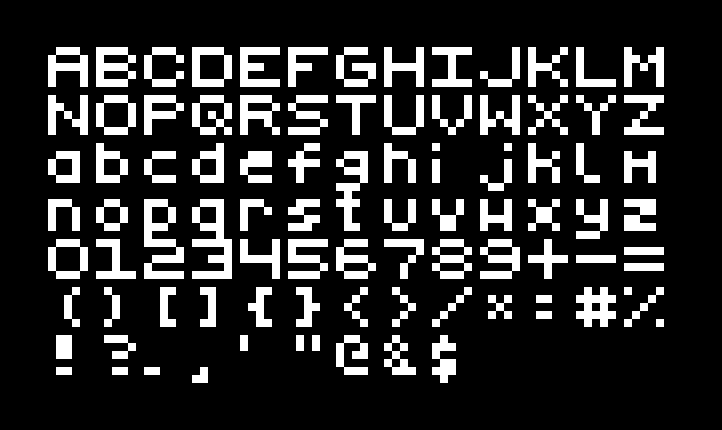
An atlas like this combined with a look-up of where each character is, means we can represent any text we want reasonably efficiently.
The downside to the texture atlas is that you’re constrained to the resolution of the texture.
Another option is to support text rasterisation in the renderer, this is something I’m interested in trying some time but I know it’s not easy, not only because nothing is, but because I watched a video from Sebastian Lague on this topic, which I highly recommend.
I decided to try make use of the line renderer.
A 7-Segment Display
Rendering bars with the line renderer is a no-brainer, a bar is just a thick line.
Text can also be drawn with lines, and if you want smooth curvy text you’d just have more shorter line segments.
I’m in luck because I don’t need smooth curvy text, I only really need digits and blocky / pixelated text will work well for this retro-style shmup.
An intuitive way to approach this for a line renderer is to render the text like you would with a 7-segment display.
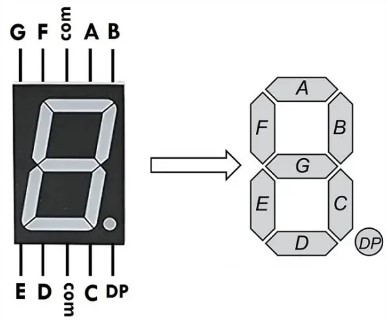
You’ll have seen these around in many consumer electronics, they’re very simple.
To display a ‘1’ you send voltage to the ‘B’ and ‘C’ pins, ‘2’ would be ‘ABGED’.
You get the gist.
So in essence, I’m doing something similar for my HUD and this worked out fairly well.
I do intend to replace the ‘P’ (power) ‘S’ (shield) and ‘A’ (ammo) labels, these are just placeholders. For that I do intend to use a texture atlas and when I do that, I’ll probably replace the line rendererd text too. We’ll see.
A couple of new things here, if you double-tap left/right you dash/barrel-roll like before, but if you do this at the edge of the screen, you ‘phase shift’ to the other side.
If you double-tap up you sprint, double-tap down will cancel it (if you don’t run out of power first).
You’ll notice the HUDs power-bar reacting to the energy costs. And while it automatically refills now, eventually I’ll have collectables and power-ups that will refill the bars and modify game-play.